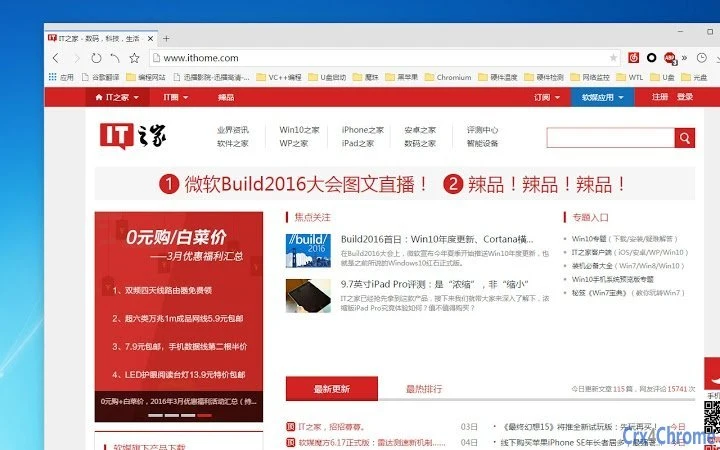

Qiyu Browser Gray Default Skin
Designed for users seeking a sleek, minimalist interface, the Qiyu Browser Gray Default Skin enhances the browsing experience with a refined visual aesthetic. This theme is tailored for those who value clean design and consistent UI elements across their desktop environment. The skin is specifically built to be used with the Qiyu Browser, ensuring seamless integration and optimal performance within the intended platform.
It addresses the need for a distraction-free browsing interface, ideal for professionals, students, and casual users who prefer a subdued, modern look. Real-world use cases include long reading sessions, focused work, and daily web navigation where visual clarity and simplicity are prioritized. The theme does not alter core browser functionality—its purpose is purely aesthetic, aligning with the growing trend of customizable digital environments.
Key Features & Capabilities
- Minimalist Gray Design – A uniform gray color scheme reduces visual clutter, promoting focus during extended browsing sessions.
- Native Integration with Qiyu Browser – The skin is engineered to work exclusively with the Qiyu Browser, ensuring consistent rendering and compatibility.
- Lightweight Installation – At just 1.5 MB, the skin imposes minimal storage impact and loads quickly without affecting browser performance.
- Consistent UI Elements – Buttons, menus, and toolbars adopt a uniform gray tone, creating a cohesive and professional appearance.
- Easy Application – Users can apply the theme through the browser’s built-in theme manager with a single click.
These features support a streamlined workflow for users who prioritize visual harmony and interface consistency. The theme is particularly effective in environments where reducing visual fatigue is important, such as during research, content creation, or multitasking across multiple tabs. By aligning with the browser’s native design language, the skin maintains usability while enhancing aesthetic appeal.
User Interface, Workflow & Performance
The user interface of the Qiyu Browser Gray Default Skin follows the standard layout of the Qiyu Browser, with no deviations in navigation or layout structure. Users can expect familiar controls, including address bars, tab management, and settings menus, all rendered in the designated gray palette. The workflow remains unchanged from the default browser experience, ensuring that users do not face a learning curve when applying the theme.
Since the skin is purely visual, it does not interfere with page loading speed, memory usage, or CPU performance. The developer did not specify resource usage details, but based on the 1.5 MB file size, the impact is expected to be negligible. Stability is maintained through integration with the official browser, and no reported issues with crashes or rendering errors were noted in the provided information.
Compatibility & System Requirements
The Qiyu Browser Gray Default Skin is compatible with Windows and Mac operating systems, as specified by the developer. It is designed to run on the Qiyu Browser, version 1.0, and requires the browser to be installed prior to theme application. The installation size is 1.5 MB, which is minimal and suitable for most modern desktop systems.
Exact system requirements were not listed, but given the lightweight nature of the file, it is likely to function on systems with standard specifications. The developer did not provide additional hardware or software prerequisites. Platform compatibility information is limited to the operating systems mentioned, and no support for mobile or other desktop platforms was indicated.
Pros and Cons
Pros
- Lightweight at just 1.5 MB, minimizing system impact
- Designed specifically for Qiyu Browser, ensuring full compatibility
- Offers a clean, distraction-free visual experience
- Easy to install and apply with no technical setup required
- Free to use with no hidden costs or subscriptions
Cons
- Only works with the Qiyu Browser, limiting cross-browser use
- No customization options for color shades or UI elements
- Does not include additional functionality beyond visual styling
- Compatibility restricted to Windows and Mac only
- Version 1.0 suggests limited feature set or early release status
Is the Qiyu Browser Gray Default Skin free to use?
Yes, the skin is available at no cost. It is distributed as a free utility for users of the Qiyu Browser.
Can I use this skin on browsers other than Qiyu?
No, the skin is designed exclusively for the Qiyu Browser. It will not work with other web browsers due to integration requirements.
Does this theme affect browser performance?
No, the theme is purely visual and does not alter browser functionality or resource usage. Performance remains consistent with the default browser experience.
How do I install the skin?
Installation is straightforward: download the skin file and apply it through the Qiyu Browser’s theme manager. No additional software or configuration is required.
Is the theme updated regularly?
The current version is 1.0. While update frequency is not specified, users should check the official Qiyu website for the latest version and any available improvements.
Final Thoughts + CTA
The Qiyu Browser Gray Default Skin delivers a focused, elegant interface for users who value visual simplicity and consistency. While it serves a narrow purpose—enhancing the look of a single browser—it does so effectively and without compromise. Its lightweight design, free access, and seamless integration make it a practical choice for anyone using the Qiyu Browser.
The lack of customization and limited platform support are notable constraints, but they are balanced by the theme’s reliability and clean execution. For users seeking a calm, modern browsing environment, this skin is a strong option. Download Qiyu Browser Gray Default Skin now.







